Showing posts with label Browsers. Show all posts

OpenAI To Develop Its Own Web Browser to Take on Google Chrome

OpenAI to Develop Its Own Web Browser to Take on Google Chrome

OpenAl is reportedly considering developing its own web browser to rival Google Chrome. This potential move reflects OpenAl's ambition to expand its footprint beyond Al development, leveraging its technological expertise to disrupt established industries.

The planned new browser would integrate OpenAl's advanced language models, such as GPT, directly into the browsing experience, offering users intelligent search and assistance capabilities. Features like automated summarization, real-time translation, and context-aware search could set the browser apart.

Further, OpenAI's proposed web browser would emphasize privacy and personalization to differentiate itself from existing browsers like Google Chrome. The new browser will reportedly have enhanced encryption protocols to ensure that user data is protected. With Minimal Data Collection, the proposed OpenAI browser would have commitment to collect only essential user data, with a focus on user consent and transparency.

OpenAl has already discussed plans with several website and app developers, including Condé Nast, Redfin, Eventbrite, and Priceline, to build the web browser.

OpenAI is also in talks with Samsung to integrate its Al features into Samsung devices, which could challenge Google's stronghold in the mobile market. The Samsung collaboration aims to bring features like ChatGPT and other AI technologies to millions of Samsung users, potentially rivaling Google Assistant. The partnership could also extend to Samsung's upcoming AR smart glasses and other device.

To recall, messaging app Telegram launched its own in-app browser, in August this year, that supports multiple tabs, making Web3 available to almost a billion users. It also launched a Mini App Store.

Notably, several tech companies are working on new and innovative web browsers to challenge the dominance of existing ones like Google Chrome and Safari.

Arc 2.0, by The Browser Company, is a browser designed to be more than just a web browser, aiming to become a user's primary computing interface. It integrates AI to streamline browsing processes, such as renaming downloads, summarizing web content, and allowing users to ask ChatGPT questions directly from the URL bar.

Browsers like Google Voice Control, Mozilla Scout, and LipSurf are expected to become mainstream, offering a new way to browse the web using voice commands.

Besides the new browser, OpenAl is also developing a new series of reasoning models called OpenAl 01, designed to solve complex problems in science, coding, and math. These models are trained to spend more time thinking through problems before responding, similar to how a human would.

Telegram Launches in-app Browser and Mini App Store Making Web3 Available to Almost a Billion Users

Telegram Launches in-app Browser and Mini App Store Making Web3 Available to Almost a Billion Users

Messaging app Telegram has announced a new in-app browser that supports multiple tabs, making Web3 available to almost a billion users, a Mini App Store, a new kind of mini apps, the ability to gift Stars to friends — and much more.

Telegram Browser

Telegram Browser

Pages you open with the in-app browser can now be collapsed and reopened from the bottom bar, allowing you to freely move between your messages and websites, instant view articles, and mini apps.

Telegram's browser supports decentralized websites hosted on TON — in all mobile and native desktop apps. This makes Web3 immediately available to our almost one billion monthly users.

Now, when you receive a notification while reading an article, viewing a web page, or playing a game, you can check your messages — and go back without losing your progress. You can also add bookmarks to return to a page later.

Developers can learn more about decentralized TON Sites by visiting ton.org — or opening getting-started.ton in the latest version of Telegram.

Mini App Store

More than 500 million out of Telegram's 950 million users interact with mini apps every month.

Mini App Store

We've added a new 'Apps' tab in Search which shows a list of apps you use and a list of popular mini apps. Now you can quickly access all your games and services — or find something new.

Developers can now upload video demos and screenshots for their mini app previews to let users know what to expect.

Mini apps that utilize Telegram Stars now have a chance to be shown in the 'Popular Apps' section. Developers can learn more about mini apps on this page.

Sharing from Mini Apps to Stories

Mini apps can now generate custom story content — like AI-generated videos, achievements, or snapshots of leaderboards — for users to share as a Telegram Story right from the mini app. This enables new kinds of apps — and helps existing ones spread among their users' contacts.

Developers can go here for more details about adding this feature to their mini apps.

Gifting Stars to Friends

Telegram Stars let you buy digtal goods in mini apps or access paid content in channels. With this update, you can buy stars as a gift for your contacts.


To gift stars, go to Settings > My Stars (on iOS, you will currently see this menu only if you have previously purchased stars for yourself).

Users celebrating their birthday will appear at the top of the list in a special section. Gifted stars will show up in the chat as a beautiful animated gift box.
Flash when Recording Video Messages

Video messages now let you use the front flash to brighten your screen with extra light when recording in the dark.

Tap the microphone icon in the message bar to switch to video recording. Then press and hold the camera icon to record your video message. Swipe up to keep recording and tap the flash icon in the bottom left corner.
Weather Widget in Stories

Users can now share the weather in their stories by adding an animated widget to everything from sunny selfies to ski slopes.
Story Covers

When posting a video story to your profile, you can choose which frame will be used as the cover photo.

Browser and Mini App Tabs on MacOS

Before you go, check out how gorgeous the new browser on Telegram for macOS is. Its new tabs support everything: games, mini apps, instant view pages and even Web3 ton-sites.

Telegram to Launch Its Own Mini App Store and In-App Browser

Telegram to Launch Its Own Mini App Store and In-App Browser

Telegram, the popular messaging app, is making some exciting moves. Founder Pavel Durov recently announced that Telegram will launch an in-app browser and a mini app store by the end of July 2024.

Recently, Telegram announced that its active user base has surged to 950 million, and they aim to cross the 1 billion mark this year. The growth in users comes amid an explosion in blockchain-based games, such as NotCoin, that users tap to play on Telegram.

The upcoming app store within Telegram will allow users to discover and access mini apps directly from the platform. The mini app store will host lightweight applications within Telegram. These mini apps can offer various functionalities, including games, tools, and services.

The app store will also have web3 support, aligning with Telegram's commitment to blockchain and cryptocurrency. This move comes after the company's initial coin offering (ICO) in 2018 faced challenges. Now, Telegram is actively promoting web3 technology on its platform.

The in-app browser will allow users to view web content directly within Telegram, streamlining their experience. No need to switch between apps.

According to Pavel Durov, CEO and Founder of Telegram, "To keep the fire going, this month, we will introduce a mini app store and an in-app browser with support for Web3-Pages. "

Telegram acknowledges the issue of scams and is taking steps to address it. The messaging app plans to display the month of registration and principal country for public accounts, similar to Instagram. Additionally, organizations can use mini apps to issue labels for channels, creating a decentralized marketplace for third-party verification.

Back in 2022, Durov had said that Telegram aims to develop decentralized tools, including non-custodial wallets and decentralized exchanges, to securely facilitate cryptocurrency transactions for millions,

Telegram is continuously evolving. In early of this month Telegram launched series of new features and updates, including "Minimized Mini Apps" feature wherein users can minimize mini apps for smoother multitasking. This feature enhances the overall user experience by allowing seamless transitions between different tasks within the app. "Telegram Stars" enables users to purchase digital goods and reward creators through paid posts. It's a way to support content creators and engage with their work.

Hashtag and Location Search in Stories also launched recently. Content discovery gets a boost with hashtag and location search functionality in Telegram Stories. Users can explore relevant content more easily. A new "customizable link widget" improves link visibility within stories. This feature allows creators to share links effectively with their audience.

Brave Browser Users in India Can Now Connect ZebPay Account with Brave Rewards (BAT)

Brave Browser Users in India Can Now Connect ZebPay Account with Brave Rewards (BAT)

ZebPay, India’s oldest and most trusted crypto asset exchange, today announced its exclusive partnership with the Brave browser, a revolutionary web browser known for its innovative rewards system and deep commitment to user security and privacy.

With this partnership, Brave Browser users in India will now be able to connect a ZebPay account to Brave Rewards in order to begin earning Basic Attention Tokens (BAT). Existing users in India with previous earnings will also be able to connect a ZebPay account and have their balances redeemed for BAT and transferred to their ZebPay accounts. In the near future, creators will also be able to connect a ZebPay account to their Brave Creators account, allowing them to receive BAT contributions from Brave Rewards users.

This exclusive partnership makes ZebPay the only crypto exchange in India to have this feature and one of only three globally. The partnership aims to empower users by enabling them to maximize the potential of their accumulated BAT token rewards. Users will be able to use this feature by creating an account on ZebPay and linking it to their Brave Rewards wallet.

Rahul Pagidipati, CEO, ZebPay,
said, “We are thrilled to be the exclusive partners for Brave Rewards in India. This strategic partnership not only reinforces our commitment to empowering users but also demonstrates our unwavering support of the crypto ecosystem in India. By enabling users to seamlessly transfer Brave Rewards to ZebPay, we are unlocking a new realm of possibilities for crypto enthusiasts. This is a testament to ZebPay's vision of creating a more inclusive and accessible crypto ecosystem where users can fully harness the potential of their digital assets."

"We're thrilled to partner with ZebPay to enable our millions of Brave users in India to benefit from their Brave Rewards experience," said Brendan Eich, CEO and co-founder of Brave. "With this custodial integration, users can seamlessly access their BAT payouts in their ZebPay account and get rewarded for their online attention."

This strategic alliance underscores ZebPay's role as a pioneer within the Web3 landscape in India, propelling the crypto industry towards a future of accessibility, security, and digital empowerment.

ZebPay is India’s oldest crypto asset exchange, with more than 7 million downloads. Founded in 2014, ZebPay aims to be the leading blockchain asset solution provider and the #1 financial advisor for all Indians invested in the crypto space. The company’s mission is to help its members achieve financial freedom in the Web3 economy. ZebPay’s secure and compliant exchange is available via the web and on the Google Play Store and Apple App Store. ZebPay members can invest in Bitcoin, Ethereum, and many other crypto assets, trading both crypto-fiat and crypto-crypto pairs. ZebPay OTC, a bespoke trading desk for high-volume clients, serves both individuals and institutions. For more details please visit: https://zebpay.com

Brave Software’s fast, privacy-oriented browser, combined with its blockchain-based digital advertising platform, is reinventing the Web for users, publishers, and advertisers. Users can opt into privacy-respecting ads that reward them with the Basic Attention Token (BAT), a frequent flyer-like token they can redeem or use to tip or contribute to publishers and other content creators. Brave is a driving force leading the way for Web3 adoption, directly supporting Web3 into the broader Web through its privacy browser, independent search engine, and browser-native, multi-chain crypto wallet. Brave currently has over 60 million monthly active users and over 1.8 million Creators.

You can learn more about Brave at brave.com, or follow the company on Twitter @brave.


5 Best Web3 Browsers To Access Decentralized Apps

Web 3.0 Browsers

Web 3.0, also stylized as Web3, is a concept of a new version of the World Wide Web which is decentralized with more data-privacy and most importantly not run by handful of companies wherein users' personal data are being used by big tech firms. Thus, Web3 is more of Web 2.0 + Blockchain technology, so as to make internet decentralized which is focused more towards users' data-privacy.

In Web3, users can create their own platforms, profit from them, and at the same time reclaim their data. Conceptually, Web3 is a group of tools & technologies including DeFi, DeX, MetaVerse and Non-Fungible Tokens (NFT), among others.
Last year, we published a list of seven new-age browsers, that put autonomy of online data back into hands of its users.

This time, we're listing Web 3.0 Browsers. Web3 browsers are those browsers that are required to interact/access applications -- DApps (Decentralized Apps) -- built on the Blockchain, while respecting data-privacy. To use general available web-browsers like Google Chrome or Mozilla Firefox to access Web3, a browser extension Metamask can be used which allows users to access Ethereum wallet as well as to interact with DApps.

1. Brave


Features -

  • Legacy Crypto Wallet
  • Free Video-Conferencing with "Brave Talk"
  • Anonymized network routing (Tor mode)
Besides supporting web3 DApps, Brave has inbuilt wallet which is CoinGecko sourced and supports for multiple coins as well as NFT. Additionally, if you already have assets in other wallets, such as Metamask Ledger or Trezor. In that case, you can import them to Brave Wallet.

Brave browser, which automatically blocks online advertisements and website trackers in its default settings, also provides users the choice to turn on optional ads that pay users for their attention in the form of Basic Attention Tokens (BAT) cryptocurrency.

2. Opera Crypto Browser

Opera Crypto Browser

Features -

  • Latest news, podcasts, airdrops 
  • Native non-custodial crypto wallet
  • No-log browser VPN, native ad-blocker and tracker blocker
  • Access to Web3 websites and dApps – directly from the browser’s address bar

Opera is a popular web browser with the start of internet era, and it recently added Web 3.0 support along with a VPN, multi-network crypto wallet, and dApp support.

Opera Crypto Browser (currently in beta) provides crypto enthusiasts and the crypto-savvy with a smooth and comfortable Web3 experience.

With Web3-focused features, Opera Crypto Browser unifies browsing the web with accessing DApps and metaverse platforms by partnering with key ecosystems and blockchains, including Polygon, Solana, Unstoppable Domains, Handshake and ENS

3. Osiris


Features -
  • Access to dApp marketplace
  • Blockchain Games
  • Eliminates needless data charges incurred by ads.
  • Anonymous browsing 
Osiris is a blockchain-based web browser and claims to be 3-7 times faster than traditional web browsers with its hyper-speed browsing feature.

Osiris Browser supports dAppstore, a dApp marketplace for decentralized applications. dApps is a blockchain platform that is quickly growing into the global market, especially with the rising popularity of De-Fi and NFT.

Through a close partnership with dAppstore, Osiris Browser supports De-Fi, NFTs, and blockchain games.

4. PUMA 

Features -

  • Built-In Payments for creators, app & game developers via Coil and Interledger Protocol
  • Access to Blockchain-based P2P networks - HNS & ENS
  • Private Browsing
  • Ecosia search, that plant trees while you search the web.

Puma is a is a privacy-focused mobile browser and wallet for the Web3 ecosystem. Puma browser allows access to new Coil premium content network, a new way to support creators directly via Web Monetization standard.

Coil is based on the ideology of web monetization without relying on advertising, site-by-site subscriptions or losing data-privacy. With Coil, you pay the creator/publisher of the content you consume. Coil presents it in a subscription-based model. You pay 5 dollars per month, and you can access the content that is locked behind a paywall for free.

5. Beaker 

Features -

  • Create a P2P site
  • Make Websites from inside the browser 
  • Share Websites without setting up servers
Beaker is a new browser that lets you create and host websites from within the browser itself. It comes with its built-in website editor with various tools and APIs. Beaker uses a new peer-to-peer network called Hypercore Protocol. Other Beaker users can visit these Websites with no servers required.

Beaker is great for classrooms and offices where you need an easy way to share Websites without setting up servers or touching the command-line.

Now Edit PDF Documents Directly on Google Chrome Browser


Adobe has rolled out an update to Google Chrome's Acrobat extension. Post this update, users will be able to edit PDF files within the browser itself. Earlier the extension only allowed users to view, copy and perform various other tasks on PDF documents.

The updated extension is simply called “Adobe Acrobat” and is automatically added to Google Chrome while installing the security update, though it require users to enable it when launching the browser.

Also available on Microsoft Edge, the new Adobe Acrobat PDF tools solve a age-old problem for users everywhere, allowing a much smoother way to view and edit PDF documents directly in the browser.

Uptil now users had to either open a new app on the desktop or search a web-app to edit PDF. But now with this new update, users can comment, mark up, fill in, and do more, including sign in, on PDF files directly from the browser window.

The updated extension will also allow users to rotate, delete, or reorder PDF pages to optimise viewing and printing, transform a PDF to a Microsoft Word document and retain formatting. You'll also be able to convert web pages into PDF, preserving layout, formatting, and links - saving major headaches for users everywhere.

However, if you want to delete certain pages from PDF file then membership is required. According to the particular support page, the new features were made available sometime in August. But the company is now showing extra tools.

7 Web Browsers in Race For The Next Number #1 Browser


Web browsers serve as the platform through which users from across the globe access the contents of the internet. As of March 2021, an estimated 51 Crore (5.1 billion) people used a browser, according to Internet World Stats.

As of June 2021, the Google Chrome browser accounted for around 65.32% of global market share for internet browsers. Apple’s Safari browser was the second most popular internet browser around the world, accounting for over 18% of market share. Apart from these two, no other browser controlled more than 5% of the overall market share.

We have shortlisted seven of the new-age browsers, that can be strong contenders to Chrome as a tool to access Internet. 

Vivaldi Browser


Vivaldi is an answer to browser fans requesting a more robust, powerful browser. It features impressive customization and access to Chrome's vast library of extensions. Its a fast browser while being light on RAM consumption compared to other browsers.

Vivaldi’s latest update on desktop and notebooks lets you expand tab groups with Accordion Tabs and run browser commands in a sequence with a single shortcut.

Vivaldi CEO Jon von Tetzchner was also the co-founder of Opera, one of the earliest web browsers to have features like pop-up blocking and tabbed browsing. The level of customization and power-user features that set Opera apart are present today in Vivaldi as well, along with plenty more.

Vivaldi 2.0 is available for Desktop (Windows, macOS, Linux) and Android devices.

FEATURES -

  • Built-in Mail client
  • Mouse Gestures,
  • Tab Grouping
  • Screen Capture
  • Ad-blocker
  • Floating Side Panels
  • Resizable Split-Screen Tabs
  • Create Custom Keyboard Shortcuts
  • Web Panel suggestions based on browsing history

SigmaOS 

SigmaOS is a new type of macOS browser made for work. It's as fast as Safari, and it's built around workspaces and multitasking. Like Slack, in SigmaOS, your browser activity is separated into workspaces - one workspace per project. This means your workspaces and pages are synced across your devices.

Besides, SigmaOS lets you log in to different accounts in your different workspaces. You can do so by clicking on the settings gear when creating a workspace and enabling "Separate Cookies".

FEATURES -

  • Send webpages to colleagues & friends, directly into their browser
  • Split screen for multitasking
  • Syncing workspaces and pages across devices.

Sidekick Browser


Sidekick is a new browser based on Chromium. Designed to be the fastest online work experience, Sidekick's UX is built around the most popular web apps, supports multiple logins, and uses workspaces to keep tab clutter under control.

The browser has an AI-based tab suspender so that Sidekick uses the same amount of memory whether you have 10 open tabs or 100. It also saves memory by automatically suspending tabs that you don't need at the moment. The best thing about Sidekick is that it has built-in search bar with a single shortcut. With this, you can search across all your apps, tabs, and workspaces in seconds.

Sidekick’s also allows to let you work from inside apps that live in the browser, rather than scattered across multiple windows and tabs. Apps like Slack, Skype and WhatsApp can be pinned in the sidebar in a vertical stack where you can easily find and switch between them. It also has support for multiple logins, granular notification controls and the ability to search across all these third-party apps (it offers 'hundreds' currently but says users can add custom adds "which would function just like a bookmark") right from the browser.

FEATURES

  • AI Based Tab suspension
  • Improved RAM Management
  • Block data-grabbing ads

Blisk

Bowser For Web Developers


Blisk is a Chromium-based browser for Web developers that enables features that your regular browser cannot. You can see how your website or application work on different display resolution, you can prototype, test your product and get notified if there is a bug to fix.

This browser enables to build your website on desktop and mobile simultaneously. It has set of preinstalled phones and tablets with specific screen resolution, pixel ratio, user agent and touch event support. Mobile and desktop follow each other by URL and even scroll position. Page auto-refresh feature enables to refresh pages automatically every time you modify the code. Developer tools now are available for both mobile and desktop simultaneously.

FEATURES

  • More than 50 devices integrated, including iOS, Android, iPadOS, macOS, Windows, Samsung Galaxy and more.
  • Place devices next to each other and compare the UI on mobile and desktop simultaneously
  • Built-in Error Monitor, to immediately detect issues (like JavaScript errors) when executing a new piece of code in Blisk. 
  • Screenshots or video recorder, with automatic upload to Blisk's secure cloud storage.
  • Launch Blisk from Command Prompt or Terminal.

Sizzy


The browser for designers and developers, Sizzy is to save time and increase the productivity of designers and developers. The browser allows to you to work on your website and instantly preview the changes on multiple devices at once. Sizzy simulates the viewport and user agent of each device, so the results should be the same as what you would see on a real device.

However, Sizzy cannot simulate different browser rendering engines, so there's a chance that there might be some minor differences when testing on a real device.

FEATURES

  • Simulates the device frame, the UI for the browser & OS
  • DevTools, it allow you to inspect multiple devices at once.
  • Debugging Panel - The tabbed panel docked on the right side in Sizzy browser. It contains a bunch of useful tabs with tools that will help you with debugging your website.
  • Customizable UI
  • A/B Testing
  • Universal Inspect Element which allows you to inspect all devices at once

Cake Browser

The world's first swipeable mobile web browser


Cake is a faster, more private mobile browser with free VPN. Cake skips over the search results list to take you straight to the content you want—then you simply swipe to see the next result.

With Cake, enter your search and then swipe through results from multiple online search services, videos, images and shopping. The browser has incorporated a fresh new approach to RSS that essentially allows you to follow your favorite sites and get the latest updates from them, whether they are blogs, news outlets or any other type of site that has an RSS feed.

FEATURES -

  • Built-in Ads & Tracker blocking
  • Free VPN
  • Automatically informs websites you visit that you do not want to be tracked
  • Force websites to be loaded via HTTPS 

Brave


Brave is a free and open-source web browser based on the Chromium. Brave is a privacy-focused browser, which distinguishes itself from other browsers by automatically blocking online advertisements and website trackers in its default settings. It also provides users the choice to turn on optional ads that pay users for their attention in the form of Basic Attention Tokens (BAT) cryptocurrency.

Recently, Brave built its search engine out of Tailcat, which it acquired earlier this year from Germany's Hubert Burda Media. Tailcat was designed to deliver search results without logging user activity or creating profiles.

FEATURES -

  • Ad blocking
  • Fingerprinting prevention*
  • Make a playlist in Brave browser
  • Brave Firewall + VPN
  • Earn Cryptocurrency (BAT) by viewing private ads

StockEdge Introduces Browser-Based Research & Analytics Platform For Stocks & Mutual Funds

StockEdge, a leading stock market data analytics company of India has introduced StockEdge Web, a browser-based stock market research and analytics platform for the use of stock market participants and mutual fund investors of India. StockEdge Web will complement its highly popular Android and iOS based mobile app StockEdge, which has over 1.5Million downloads and a 4.6 rating on Google Play.

StockEdge Web aims to provide its users with the ability to research the two most important investment options today: stocks and mutual funds. The platform is completely responsive and can adapt itself to any screen size. It can be seamlessly accessed from desktops/laptops, tablets and even mobile phones using any popular web browser. Therefore, the users will be now able to view stock charts on large screens and analyse the market data more conveniently.

StockEdge Web also comes with some remarkable new features like:


  1. A completely new section on Mutual Funds has been added to give the users the convenience of analysing the top-performing funds, schemes, AUM, NAV, fund returns, etc. Thus, the users will now be able to research the stocks and mutual funds under the same window and create watchlists of the same within StockEdge Web itself.

  2. Company Financial data of the past 9 years has been made available for facilitating better Fundamental Analysis of stocks.

  3. A contextual information panel will be made on every screen to make new users familiar with the meaning of various stock market terminologies.

  4. StockEdge Web is multilingual. Users can optionally view the platform in Hindi and Bengali, instead of the default English.

  5. StockEdge Web features a brand-new UI and a Dark Mode theme. Hence, the users now have the option to use the default light theme or switch to the Dark Mode to reduce eye strain.

  6. The users of StockEdge Web Premium version will be able to take notes within every screen and sync it with their Google account for future reference. 


Speaking on this occasion, Mr Vivek Bajaj, Co-Founder, StockEdge said "There are various websites providing information on stocks and mutual funds. We realised that most of them are very cluttered with lots of ads or provide information in an extremely unfriendly manner for individual investors. The advantage of StockEdge platform is strong integration with learning content assuming that the user does not understand most of the concepts behind the data points. Also, one feedback we received from the StockEdge app users was that they want the convenience to access StockEdge from a variety of devices including desktop. We have worked on technology which will make StockEdge available in any screen size. We are constantly working on improving our offerings and our goal is to give the power of research and analytics to every investor. The introduction of StockEdge Web is an important step in this direction.

The basic version StockEdge Web is accessible for free at https://web.StockEdge.com/. Apart from the free plans, there are two premium plans which unlock some powerful additional features and are meant for those who want to take their investments to a different level.

Opera Browser now allows to Buy, Spend Bitcoin and Ethereum using Debit Card, Apple Pay


Freeware browser Opera, which is the first major browser to introduce a built-in crypto wallet in July 2018, is now introducing another feature allowing its users in the US and Scandinavia easily purchase cryptocurrencies using a debit card or Apple Pay.

Easy crypto top-ups are available in Opera;s flagship Android browser, its iOS browser Opera Touch as well as in the crypto wallet available in its desktop browser. The integrated solution is available in the United States and Scandinavia.

Developed by Opera Software AS, a Norwegian software company, Opera's strategy is to eliminate the hurdles associated with the use of cryptocurrencies on the Web. In December 2018, Opera introduced the first blockchain-enabled browser "Opera for Android" with a built-in crypto wallet and Dapp explorer.


Opera is tying-up with US-based cryptocurrency infrastructure provider Wyre, which allows transactions on Apple devices works seamlessly with Apple Pay, making it possible to top up an account in less than 30 seconds. Opera Android users in the US can now buy BTC and ETH using a debit card. iOS users can simply use Apple Pay.

Later, it added a built-in crypto wallet to its desktop browser as well as to its iOS browser, Opera Touch. It later introduced easy crypto-purchases in Sweden, Norway and Denmark, and is now expanding them to the United States.

Charles Hamel, Head of Crypto at Opera browsers, explained how this integration supports Opera’s long-term vision of making blockchain technology relevant beyond speculation: “Allowing our users to easily load cryptocurrency into their browser’s digital wallet is very powerful, as it connects the Web to a global internet-native payment network."

Source ~ Press.Opera.com


UC Browser Launches In-app UC March Millionaire Campaign to Celebrate Holi with its Users


  • Users can win prizes bysigningincompleting easy tasks on UC Browser.

  • UC Users can enjoy fun games rich content unlimited bonus and more


As part of its localization strategy UC Browser world No.1 third-party mobile browser and a content platform from Alibaba Innovation Initiatives Business Group has launched an in-app UC March Millionaire campaign to celebrate Holi with its vast user base of 130 million MAUs. During the month-long campaign starting March 1st 2020 UC users can design unique and customized Holi greeting cards to share with family and friends.

In-app Campaign

The 30-Day UC March Millionaire campaign is dedicated to UCs valuable users with various prizes worth 30 million rupees including free Haier air conditioners motorcycles smartphones Paytm coupons and more. UC users can sign in and complete few simple tasks like inviting their friends to the campaign reading UC News storing their favorite online entertainment content in UC Drive following UC Cricket etc. and win prizes everyday. The tasks in the campaign will be different in each phase and each participant will have a chance to win prizes daily. Users who participate and complete the assigned tasks regularly for 10 or 30 days stand a chance to win mega prizes on March 30th.

Commenting on the campaign Mr. Huaiyuan Yang Vice President UC Web Global Business said The beauty of India lies in its culture festivals and community. With campaigns like these we aim to reinforce our localization strategy in India to connect more with our users and provide them with content that they can use and will add value to their day-to-day browsing. Engaging with our users; needs and interests have always been UCs top priority.

Over the last few quarters UC Browser has emerged as one of the most preferred platforms for fast-downloading and mobile data saving as well as engaging and trendy content. It has registered 1.1 billion user downloads worldwide (excluding China) with half of its global installs from India.

Win Big with UC


  • Sign in to draw prizes every day

  • Users can win cash few users get a chance to draw a unique Big Prize every day

  • Users who sign in for 10 or 30 days consecutively stand a chance to win Extra Prizes.

  • Complete tasks to redeem prizes

  • Users can collect more cash by completing simple additional tasks

  • Users can use cash to redeem Period Prizes

  • Tasks differ for each period


About UC

UC a business within Alibaba Innovation Initiatives Business Group is a leading provider of mobile internet software and services. The international product portfolio of UC includes content distribution platform UC Browser UC Browser Turbo UC Browser Mini and UC Ads for mobile marketing. UC Browser is the No. 1 third-party mobile browser in the world as per StatCounter. It has reached 430 million Monthly Active Users globally.

Additional information about UC and its products can be found at www.ucweb.com.

World’s 1st Interactive Smartphone Browser Popshot Launches in India

Popshot, the world’s first ever interactive browser built for smartphones, launches in India. Popshot is a smart app that changes the way people explore, share, and save the web through a first-of-its-kind interactive screenshot feature. This promises to redefine the users’ digital capabilities in exploring, bookmarking and sharing content by making it more visual, organized and direct. Unlike traditional browsers, Popshot has been designed to accelerate exploring through data-saving capabilities, offering users the best in-browsing experience. Popshot is now available to Android and iOS users worldwide and aims at improving personalisation and discoverability of content for the ever-growing digital community through a host of smart & interactive features.

Customized for India, Popshot promises to introduce a new benchmark to the browsing experience especially when browsers on smartphones have seen no significant innovation since its inception. Understanding India’s vast low-end phone market, Popshot has been designed as a lite app, accessible on over 10,0000 phone models with a minimum specification requirement of 1GB of RAM and above. To India’s trend in capturing and sharing screenshots, Popshot consumes significantly lesser storage by replacing boring static full resolution screengrabs with compressed interactive screenshots.

Developed as a lite and faster alternative to traditional browsers, Popshot introduces users the ability to customize their own digital playground for instant access to saved and new content, encouraging a whole new movement for users to live in the now. To maximize engagement, the user interface has been designed across 3 key in-app tabs of Friends | Personal | Explore. The Explore is the primary landing page, where users can not only browse, but also create customizable ‘popshots’ to share with their contacts or save it for themselves. In the Personal section, users can access all their saved ‘popshots’ such as the most frequented webpages, favourite product shots, videos, interesting content pages, etc. and gain direct instant access to them through the interactive screenshots deep linking feature. This ensures users don’t lose track of their pages or progress when browsing online. What’s more, is that all this content is inside the app, without occupying memory in the phone gallery, allowing users to save as many ‘popshots’ as they like. Lastly, the Friends section is a place where content shared or received from friends resides in an effectively indexed manner and is ready to be accessed through smart search around a contact’s name, website, and keywords.

On the launch of the app, Marc Miance, CEO, Popshot, commented, “We say - Save the Web - because first of all, Popshot literally does that. But, more importantly, we think the future of the Web is through our smartphones. We want the digital world to live up to its original promise, granting people the ability to mine the web’s rich seams of information and entertainment and capture its wealth. We also want to make the digital genuinely social, removing the technical constraints that prevent people from sharing in a meaningful way. A breakthrough was necessary.”

Anish Mulani, India CEO, Popshot, exclaimed his excitement on the launch of the app in India, “Today, we live in an extremely fast-paced world where consumers are always on-the-go and looking for digital content or solutions to enhance their daily social experiences at the tap of a button. With an ever-increasing number of smartphone users in India, millennials are constantly searching for connectivity to make everyday choices – what to watch, where to travel next, how to learn a new skill, etc. In the digital domain, where we are all explorers first, Popshot is positioned to feature as the future of browsers which will enable users to bring their digital world together, through a faster and more innovative browsing experience – essentially making the smartphone into a smarter phone.’’

Browsers are the gateway to digital domain and Popshot is looking at expanding the use of browsers by making it more engaging and interactive for current and newer generations of digital explorers and social media creators. Through the industry-pioneering technology of interactive deep-linked screenshots, Popshot is setting a new experiential benchmark in empowering users to elevate their digital journeys and becoming global content curators in a mobile-first world.

Start exploring today: https://get.popshot.app/PR
User reference video: https://www.youtube.com/watch?v=bdkTSWqDDcg&t=5s
Reference images: https://we.tl/t-OO2xkaREUn

About Popshot

Powered by a vision to encourage creative global connectivity, today, Popshot is the world’s first socially interactive browser and made in India and France. Officially starting their community journey in India in 2018, Popshot has been focused in its constant pursuit to develop an innovative social platform that aims to enhance global communication by encouraging freedom of exploration, expression, and discovery, with a mission to enhance user’s daily digital experience. Popshot enables users to easily browse, save, and share the web with friends and family, all over the world, through optimized navigation and creative social sharing features. Popshot made its official public debut at the World Blogger Awards 2019 as a key partner of the event, reiterating their commitment in powering and supporting new-age digital storytelling.

Microsoft Unveils 'Edge' To Replace Internet Explorer Browser

Get ready to say goodbye to your old buddy Internet Explorer. Though many of us don’t use it anymore and have moved on to fatser alternatives like Google Chrome and Firefox but many of us still have internet Explorer installed in hope of using it someday incase of some emergency.

This farewell time has arrived because Microsoft, the giant behind Internet Explorer, has something bigger and better for all of us.

Called the Edge, the new web browser was kept under wraps as 'Project Spartan' so far.The new browser is expected to be lighter and much more faster than the Internet Explorer.

Microsoft Edge is Internet Explorer's replacement. The minimalistic "chrome-free" web browser is designed to put websites up front and dispense of everything else — including icons and menus that could potentially slow page loads.

The all-new Windows 10 browser built to give you a better web experience. Write directly on webpages and share your mark-ups with others. Read online articles free of distraction or use the offline reading feature for greater convenience. Microsoft Edge is the new browser that works the way you do.

edge

On the top of all this, the new browser would come with some super amazing new features like a distraction free reading mode, a personal voice assistant app for windows, built-in notation tool and website information powered by Cortana.

"Microsoft Edge is the browser built for Windows 10, and it will be available on the widest range of Windows 10 devices," said Joe Belfiore, Corporate vice president, operating systems group,Microsoft, at Build 2015, a conference of developers.

Stating the reason behind the unique name, Belfiore said, "For us the name refers to the idea of being on the edge of consuming and creating."

"It refers to the developer notion of being closest to the modern capabilities of the Web," he added.

The browser will be different from all the current browsers as it will be able to understand what the user wants and give him/her exactly that. Edge with its built-in Cortana will have the capability to learn and understand the things that the user cares about. The browser would even help the user in getting those things done.
The software giant has already tested it a lot of times and is quite optimistic about its product this time.

Microsoft Edge hosts a new rendering engine, Microsoft EdgeHTML. This engine is focused on modern web standards, allowing web developers to build and maintain one consistent site that supports all modern browsers. This greatly simplifies the hard work of building first class web sites, allowing more time and energy for web developers to focus on reliability and security rather than the complexities of interoperability.

Further, the Edge would even give the users to try their hand at Web coding.
"Now, there's another big thing that we're doing in Microsoft Edge that has huge relevance to you.

"That is enabling users to engage with your sites and give you a shot at starting to write some Web code, which you may put into an app via Web extensions built into Microsoft Edge," Belfiore said.

Additionally, Microsoft Edge is also Microsoft's first web browser to have its voice assistant Cortana directly integrated. Speak naturally to Cortana about anything. Cortana can chat, get info, and do things for you.

Though Edge is a successor to the existing Internet Explorer but the software giant has decided to keep the latter for now. The new browser will only be available for Windows 10 and further.

Opera Mini Helps Indians save Rs.2.1 billion, claims Opera

Opera Mini Helps Indians save Rs.2.1 billion, claims Opera

Seems exaggerated, but Opera claims its mobile browser Opera Mini helped Indians save 2.1 billion rupees as mobile internet savings. Because of Opera's advanced compression technology, Indian users of the Opera Mini mobile browsers used 75% less mobile data in the first half of the year, according to a report by Opera Software.

Noteworthy, India is also home to the largest number of Opera Mini users in the world.

This internet savings is the equivalent of a monthly nationwide saving of Rs 350 million and adds up to a whopping saving of Rs 2.1 billion in the first six months of 2014.

Opera Mini users on Java-based phones saved an average of 81% in mobile data each month, while smartphone users saved about 69%, the report reveals. Among smartphone users, those on Android phones clocked an average of 68.5% savings per month, while iOS users saved about 62%.

The report is based on aggregated information obtained from the Opera Mini servers.

Opera Mini is compatible with over 3000 mobile devices, ranging from basic Java phones to the latest Android and iOS smartphones. This makes it highly popular in the Indian mobile market, which has a healthy mix of consumers using a large variety of handsets.

Opera claims that these substantial savings were achieved due to Opera Mini's advanced compression technology, which shrinks webpages down to as little as 10% of their original size, reducing data consumption by up to 90%. The data compression also helps render web-pages faster, even while roaming, or in places with poor network conditions, making Opera Mini a great companion while on the go.

"We understand how precious mobile data is for Indian consumers, and that's why our servers work very hard to shrink every bit of data possible for Opera Mini users. It's indeed gratifying to see that this translates into such gigantic savings for our Indian users. This is, however, only the tip of the iceberg. We are confident Opera Mini can help Indians save billions more", says Sunil Kamath, Vice President for Southern Asia at Opera Software.

opera mini data savings India

Google Chrome Comes Out of Beta for Mac, Linux and Fastest Version or Windows

Google Chrome Comes Out of Beta for Mac, LinuxGoogle Chrome today introduced stable (out of beta) release of Chrome browser for Mac and Linux and as announced on official blog its the fastest Chrome version yet along with most significant speed improvements.

The new Chrome stable version also host few new features as well along with inclusion of HTML 5 features and new bookmark manager build with HTML 5.

The new features includes synchronization of your bookmarks and browser preferences across multiple computers including themes, homepage and startup settings, web content settings, preferred languages, and even page-zoom settings.

HTML 5 among the new features Chrome provides support for features such as Geolocation APIs, App Cache, web sockets, and file drag-and-drop. To test the HTML 5 features in Chrome, one may browse websites built with HTML5 such as scribd.com, Gmail's dragging and dropping attachments and enabling the geolocation functionality in Google Maps.

The incorporation of HTML 5 features are gradually being added to all modern browsers such as Firefox, Safari, Opera and Chrome and now Google Chrome being the one that has added few more. IE however has been started with IE 8 version onwards with minimal features though, however there is strong commitment from Microsoft for strong support if CSS3/ HTML5 in its IE 9 version.

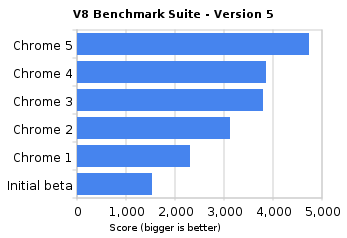
https://blogger.googleusercontent.com/img/b/R29vZ2xl/AVvXsEioQGd2WfuM0GdfGr0GyGheXlP0orTsDRXN1U9Ww6H_zP59iCSCS083VmaXm1vgYHatp-dpz4bRB1_4jU-cfZfvQ1g00MphaZ8-WLMTetfVaqxzi5C2RNpk-T3fByjOqp8A4y0OMN35ajxQ/s1600/v8_benchmark_suite_-_version_5.pngGoogle Chrome also experimenting with Flash Player integration in the browser which is yet not included by default with this stable version however it is expected to be enabled with full release of Flash Player ver. 10.1 soon in next version onwards.

Google Chrome team concluded that in short span of time i.e. since its first beta release back in September 2008 Chrome has improved by 213 percent and 305 percent in Javascript performance by the V8 and SunSpider benchmarks. The conclusion is an outcome of series of interesting speed tests for which see video below which is filmed at actual web page rendering times.

Internet Explorer 9 revealed, supports CSS3/HTML5, faster than Firefox

ie9_preview


Microsoft has revealed the preview-only/test version of its all new Internet Explorer 9 far better than any of its earlier versions and especially because the standards IE used to follow are way back than any modern browser.  At MIX 10, a interactive gathering event of Microsoft and  innovative web professionals, Dean Hachamovitch presented the insight depth of "early look" phase of IE9.

This preview of IE9 is more targeted towards web developers/ designers to let them know and take advantage of new things they can do while developing web apps or websites.  Developers can have early look at IE 9 development here.

The prominent development and new things of Internet Explorer 9 are :

  • A new JavaScript engine for IE9 which is designed to make Internet Explorer faster (faster than Firefox 3.6).

  • Support for HTML5.

  • IE9 now extensively support DOM, CSS3, SVG standards and XHTML.
    Able to render box-shadow, text-shadow and border-radius like CSS3 properties

  • IE9 is the first browser designed to hardware accelerated graphics


Interestingly, the new JavaScript engine of IE9 is said to be faster than shipping version of Firefox today as per Webkit.org’s SunSpider benchmark test.

ie9-weblkit-sunspider-test


However, the available Internet Explorer 9 Platform Preview is not be used as regular browse and it doesn’t even have a "back" button. But it released to run along with regular browser and is simply a preview and more specifically for developers/ designers so as to help them developing their web apps.

Market Reports

Market Report & Surveys
IndianWeb2.com © all rights reserved